


Data engineering teams handle many small, repetitive, judgment-heavy tasks (writing YAML configs, tuning slow SQL queries, applying correct collations/naming standards, etc.). None of these is individually difficult, but they take real time and are easy to get slightly wrong— making small mistakes that can surface expensively downstream.
AI assistants seem like the obvious fix. In practice, however, most teams run into one of two walls:
- Internal client AI tools are safe with sensitive data but often lack persistent context or sufficient model capability, forcing engineers to re-explain conventions every time.
- External tools are more capable but sit outside the client’s environment, making it unsafe to share sensitive data.
That gap is what led us to explore CrewAI, a framework for coordinating specialized AI agents, as one way to bring structured, repeatable AI workflows into day-to-day data engineering.
What CrewAI Brings to the Table
A standalone LLM is a closed system, with no environment to check itself against, no persistent memory, and no built-in way to verify its own output. That’s fine for a quick question, but it’s a shaky foundation for agentic workflows or production engineering work.
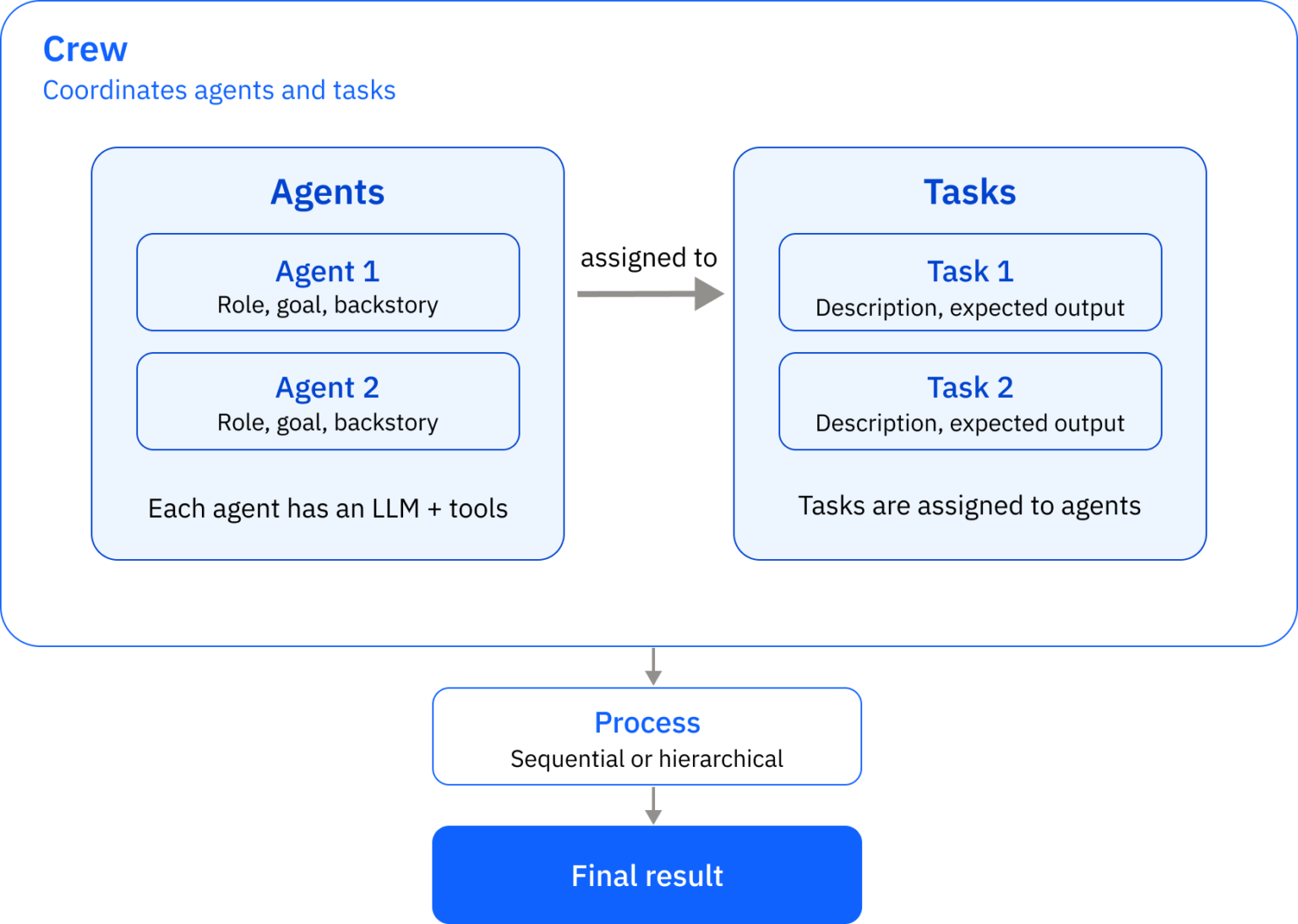
CrewAI’s answer is to give the AI structure instead of just a prompt:
- Agents: each with a defined role, goal, and backstory, equipped with an LLM and tools.
- Tasks: small, well-scoped units of work with a clear description and expected output, assigned to the right agent.
- Process: governs execution order, sequential or hierarchical, so one agent’s output can feed into and be checked by the next.
A Few Best Practices
1. Specialists beat generalists. A narrowly defined agent—for example, a “Senior SQL Query Optimization Specialist”—consistently outperforms a generic “helper” agent. Giving an agent a specific role and backstory sharpens its output more than you’d expect.
					sql_optimizer_agent:
  role: "Senior SQL Query Optimization Specialist"
  goal: "Rewrite slow or inefficient queries for performance, without changing their business logic"
  backstory: "You have spent over a decade tuning queries on large-scale data warehouses. You know how to spot unnecessary joins, late filtering, and missing indexes at a glance."

verify_agent:
  ...
2. Break work into small, checkable steps. Large, multi-purpose requests tend to make agents drop parts of the task. Chaining together focused tasks — each output feeding the next — is far more reliable.
					optimize_query_task:
  description: "Rewrite the SQL query {query} for performance"
  expected_output: "An optimized query and a short explanation of each change"
  agent: sql_optimizer_agent

verify_query_task:
  description: "Check the optimized query and verify if it has issues"
  expected_output: "A description about the issues discovered"
  agent: verify_agent
  context: [optimize_query_task]
3. Match temperature to the task. Model and temperature can be defined in crew.py. Model choice should match the task (some models return more accurate outputs for certain tasks); temperature should match how much creativity vs. consistency is needed:
- Low (0.0–0.3): structured, exact output — query rewrites, YAML generation.
- Medium (0.4–0.6): explanations and documentation, where substance matters more than exact phrasing.
- High (0.7–1.0): exploratory or brainstorming work.
The right setting is worth validating empirically (i.e., run the same input at a few different temperatures and compare) rather than just assumed. In the crew.py file below, both agents operate at a low temperature because their jobs are technical and the output must be consistent and exact every time:
					# libraries

@CrewBase
class TaskInletCrew:

    # --------------------------- Agents ---------------------------

    @agent
    def sql_optimizer_agent(self):
        return Agent(
            config=self.agents_config["sql_optimizer_agent"],
            llm=LLM(model=os.getenv("model_1"), temperature=float(0.3)),
        )

    @agent
    def verify_agent(self):
        return Agent(
            config=self.agents_config["verify_agent"],
            llm=LLM(model=os.getenv("model_2"), temperature=float(0.3)),
        )

    # --------------------------- Tasks ---------------------------

    @task
    def optimize_query_task(self):
        return Task(config=self.tasks_config["optimize_query_task"])

    @task
    def verify_query_task(self):
        return Task(config=self.tasks_config["verify_query_task"])

    # --------------------------- Crew definition ---------------------------

    def crew(self):
        return Crew(
            agents=[self.sql_optimizer_agent(), self.verify_agent()],
            tasks=[self.optimize_query_task(), self.verify_query_task()],
            process=Process.sequential,
        )
4. Keep a clear line between what’s deterministic and what isn’t. Reliable, repeatable logic (e.g., loading a file, validating input) belongs in plain Python, not in an agent’s hands. Agents should be reserved for work that genuinely requires judgment or language understanding.
					def load_and_validate_query(path: str) -> str:
    with open(path, "r") as f:
        query = f.read().strip()
    if not query:
        raise ValueError("Query is empty.")
    return query

# -- check input first, then call the crew --
query = load_and_validate_query("incoming_query.sql")

# The agent only receives a validated query
result = crew.kickoff(inputs={"query": query})
Weaker models need more explicit instructions. A frontier model can often fill in the gaps of a loosely written role or task. A smaller or cheaper model can’t — so when cost, latency, or infrastructure constraints call for a lighter-weight model, compensate with more precise, unambiguous role and task definitions.
Note: A real-world collation improvement use case applying all of these principles will be included in Part 2 of this series.

Putting It in Front of People: Streamlit
Streamlit turns a crew of agents into a usable browser app without any front-end development — something that takes hours to stand up, not weeks, and is easy to extend as new agents and tasks get added.
- Human in the loop, by design. Streamlit’s interactive components — text editors, diff views, approval buttons — let engineers review and edit agent output (a generated YAML block, a rewritten query) before accepting it. The agent drafts; the engineer keeps final say.
- A word on accuracy. No LLM-based system, however well-structured, is 100% accurate. Good design improves reliability, but it doesn’t eliminate error. The human review step isn’t optional — the goal is to speed up repetitive work, not to replace final judgment.
A Side-by-Side Look: CrewAI and Snowflake Cortex Agents
It’s worth placing this approach alongside how Snowflake tackles the same underlying challenge. Snowflake’s own managed agent capability, Cortex Agents, is a fully managed, agentic platform built directly into Snowflake’s governed environment — and for teams already working in Snowflake, it’s a genuinely strong option. Understanding what each approach does well helps teams pick the right tool for the right situation.
How a Cortex Agent works: A Cortex Agent runs a plan → call tools → reflect loop entirely inside Snowflake’s secure perimeter. Agents are configured once using natural language and platform-native tools—Cortex Analyst for SQL generation, Cortex Search for unstructured data—and called via REST API or Snowflake CoWork, with conversation state maintained automatically.
Where Cortex Agents shines: For data that already lives in Snowflake, it removes a lot of the orchestration and deployment work a team would otherwise have to build themselves. It reuses existing Snowflake governance and role-based access control, and can automatically select among leading models like Claude, GPT, and Gemini — all without leaving Snowflake’s governed environment.
Where a framework like CrewAI complements it. There are scenarios (e.g., strict data residency requirements, integration patterns that call for a container runtime rather than a warehouse runtime, or a need for very fine-grained control over prompt structure and agent reasoning) where a code-level framework like CrewAI offers more flexibility. As with any AI system, Snowflake itself recommends reviewing outputs for accuracy, which lines up with the human-in-the-loop approach described above.
The real question when comparing these two options isn’t to ask, “which is more capable.” Rather, the most important question to ask is, “where is the data allowed to go, and how much control do we need over the process?”
Cortex Agents is the faster, lower-effort path when data can live inside Snowflake’s perimeter and policy allows it. CrewAI is a flexible complement for cases where sensitive data policies call for more control over where processing happens at Snowflake’s expense, or where precise control over agent reasoning precludes a Snowflake-native solution.
Choosing the Right Tool for the Job
Data engineering teams lose real time to repetitive, judgment-heavy work, and the usual AI tools come with their own trade-offs around data sensitivity, memory, and consistency.
CrewAI addresses this by structuring AI work around clear roles, focused tasks, and a defined process rather than leaning on a single model and a hopeful prompt. The second part of this series will walk through exactly that, complete with a real collation-improvement case study wrapped in a Streamlit app to illustrate.
Whether the right fit is CrewAI, Cortex Agents, or some combination of both often comes down to one question: where is the data allowed to go? Either way, the underlying principle holds: an AI system earns trust through the structure built around it, not just the raw power of the model behind it.
Curious how you can leverage CrewAI or Snowflake Cortex to get more value out of your next data project? Let’s talk today.