


As organizations increasingly rely on data to power dashboards, self-service analytics, and AI experiences, maintaining consistent business definitions has become more important than ever.
Metrics such as revenue, active customers, or order count should produce the same results regardless of whether they are consumed by a BI dashboard, an analyst writing SQL, or an AI agent. A semantic layer addresses this challenge by centralizing business logic, ensuring that calculations, aggregations, and governance are defined once and reused consistently across every consumer.
In this article, we’ll explore the role of the semantic layer in modern analytics and how Snowflake Semantic Views provide a native way to model governed business concepts. We’ll then examine how the dbt_semantic_view package enables analytics engineers to define, version, and deploy Semantic Views using familiar dbt development workflows and CI/CD practices.
Finally, we’ll look at how a governed semantic layer unlocks the next generation of analytics through agentic experiences such as Snowflake CoWork (formerly Snowflake Intelligence). By providing rich business context and standardized metric definitions, Semantic Views enable AI agents to generate more accurate SQL, answer natural language questions, and deliver trustworthy insights grounded in your organization’s business logic.

What Is a Semantic Layer?
A semantic layer is an abstraction that sits between your raw data and the applications that consume it. It means that you do not have to define business rules in every report or dashboard manually. Instead, you put all these rules in one place where everyone can see them, in a centralized and governed location.
At its heart, a semantic layer gives everyone the language to use when talking about business topics. So, you define what *Revenue*, *Net Sales*, and *Active Customer* mean. You do this in a way that everyone can understand. Then anyone or anything that uses the data, whether it is an analyst building a report or an AI agent powering analytics applications, can use these definitions. This way you do not get different answers to the same question.
Without the semantic layer, the rules for your business are all over the place. They are in spreadsheets and reports and custom programs. It is hard to keep track of them all. When you change one thing it can cause problems somewhere else. A semantic layer solves this by providing a single, governed location where business rules are defined, maintained, and reused.
For analytics engineers, this also introduces a more maintainable development model. Semantic definitions become version-controlled artifacts that can be reviewed, tested, and deployed using the same engineering practices already applied to data transformation code. This not only improves consistency across the organization but also enables faster development of analytics products and AI-powered experiences that depend on trusted business metrics.
Snowflake Semantic Views
Snowflake Semantic Views are Snowflake’s native implementation of a semantic layer. They provide a governed object that centralizes business definitions such as dimensions, measures, metrics, and their relationships, exposing a business-friendly view of your data instead of the underlying physical schema.
In addition to standardizing business logic, Semantic Views serve as living documentation by capturing the meaning of data in a structured, discoverable format. This metadata also provides valuable context for AI applications, enabling large language models to generate more accurate SQL using governed business definitions rather than relying solely on table and column names.
While Semantic Views provide the semantic layer itself, they still need to be authored and maintained. For teams already using dbt, the dbt_semantic_view package integrates this process into the existing development workflow, allowing Semantic Views to be version-controlled, tested, and deployed alongside the rest of the project using familiar CI/CD practices.
While Semantic Views can be created directly using Snowflake SQL, the dbt_semantic_view package allows them to be managed as first-class dbt resources. This means Semantic Views can be version-controlled, reviewed, tested, and deployed using the same workflows as the rest of your dbt project, without requiring a separate deployment process.
The example below illustrates a Semantic View defined as a dbt model using the package’s materialization:
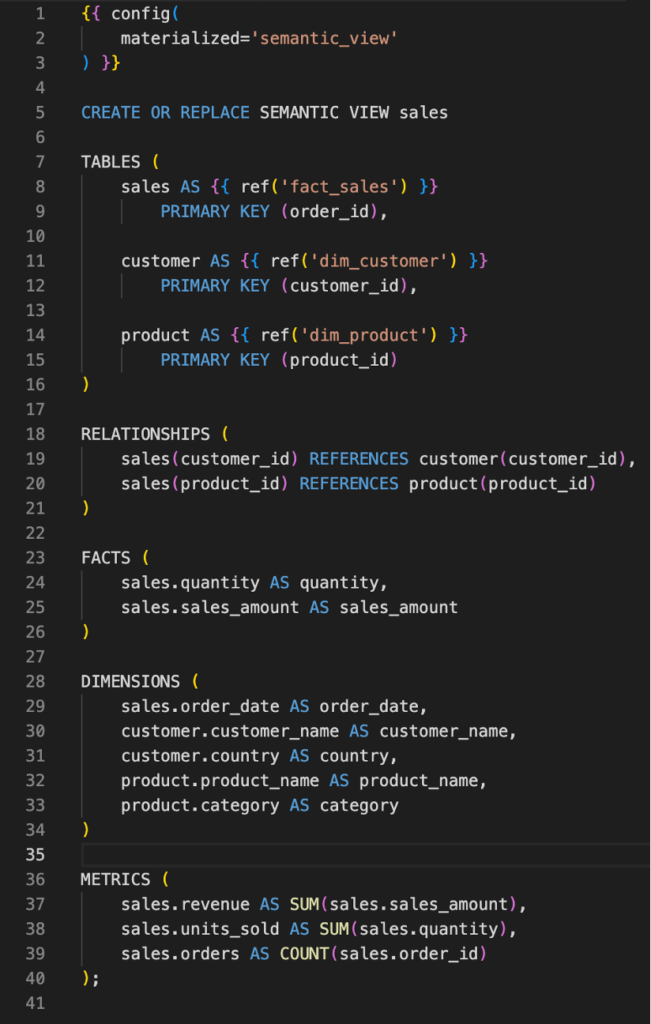
With the `dbt_semantic_view` package, Semantic Views become first-class citizens within your dbt project. Once defined, they participate in the dependency graph like any other dbt resource, allowing them to be built, tested, and deployed through your existing CI/CD pipeline.
A simple *dbt build* command is enough to execute the required upstream models and materialize the Semantic View in Snowflake, ensuring that the semantic layer is always deployed alongside the data models it depends on.
The result is a native Snowflake Semantic View, as shown in the example below:
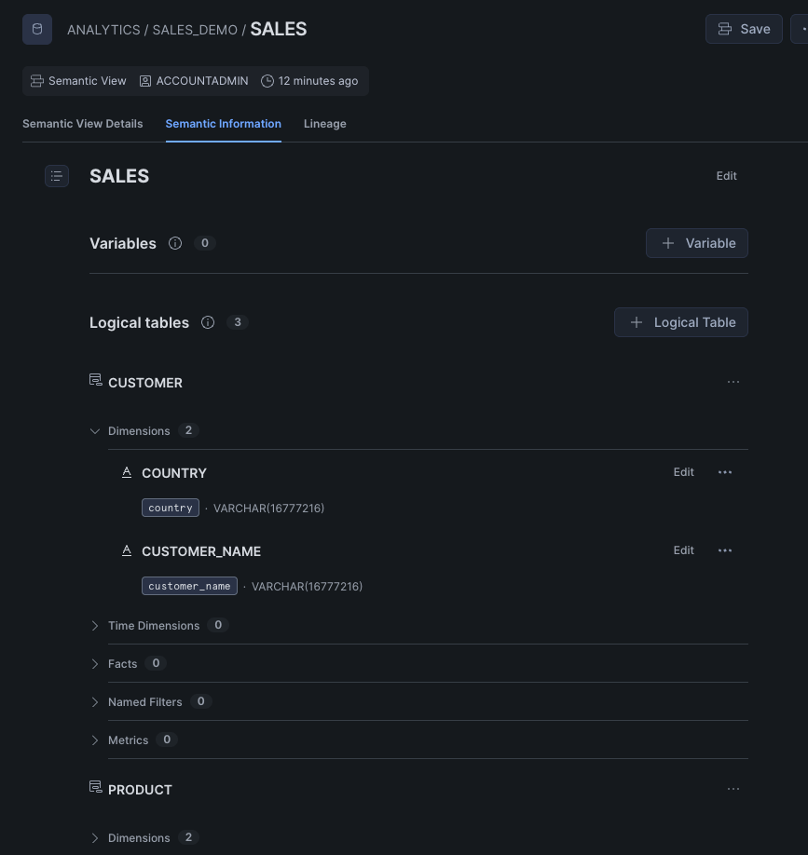
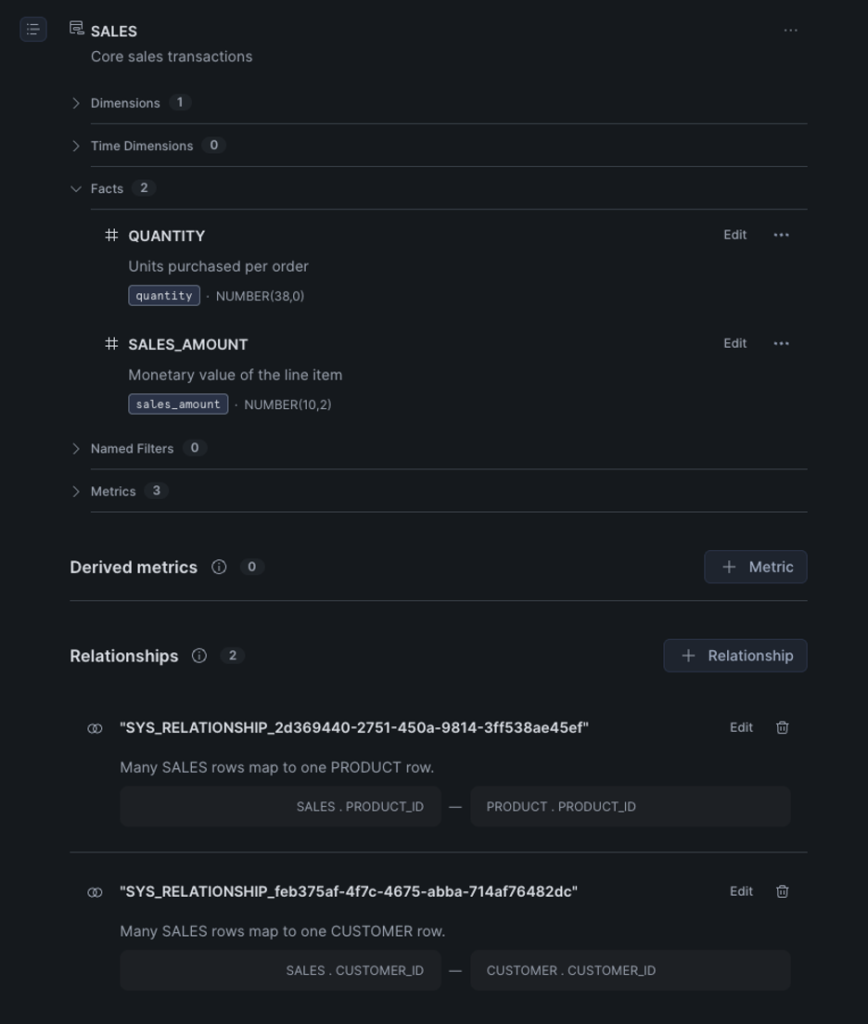
Querying a Semantic View is seamless because it behaves like any other view or table. For example:
SELECT * FROM ANALYTICS.SALES_DEMO.SALES;
One of the key capabilities of Semantic Views is the ability to explicitly model relationships between business entities. Rather than simply exposing isolated tables, you can define how facts relate to dimensions, enabling consumers to navigate the data model without needing to understand the underlying joins.
For example, in the Semantic View above, the “sales” table is related to both the “customer” and “product” dimensions. This allows analytical queries such as:
- What was the total revenue by country during the last quarter?
- Which product categories generated the highest sales this month?
- How many orders did each customer place in the last 30 days?
- What is the average order value by product category?
Because these relationships are part of the semantic model, both analysts and AI-powered applications can answer these questions without manually defining joins or business logic.
Semantic Views also support comments on dimensions, facts, and metrics. While these comments improve documentation for human users, they also provide valuable business context for AI agents. Including descriptions and common synonyms—for example, defining sales_amount as Revenue, Sales, Turnover, or Gross Sales—helps large language models better understand business concepts, reducing ambiguity when generating SQL from natural language.
Rich, descriptive metadata ultimately benefits both data discoverability and the accuracy of agentic analytics solutions such as Snowflake CoWork. All this information is also accessible through the new Snowflake ACCOUNT_USAGE views and SQL commands like *SEMANTIC_RELATIONSHIPS*, *SHOW SEMANTIC DIMENSIONS* etc.
Agentic Analytics with Snowflake CoWork
The benefits of a semantic layer extend beyond traditional BI. Snowflake CoWork (formerly Snowflake Intelligence) enables organizations to build AI agents capable of answering business questions using natural language. These agents can be configured with multiple sources of context, including Semantic Views, web search, Retrieval-Augmented Generation (RAG), and custom agent skills.
For analytics use cases, Semantic Views play a central role. By exposing governed metrics, dimensions, relationships, and business definitions, they provide the context an AI agent needs to accurately interpret user prompts and generate reliable SQL. Instead of inferring meaning from raw table and column names, the agent reasons over a business-oriented semantic model, resulting in more trustworthy and consistent answers.
This allows users to ask questions such as “What were our top-selling product categories in Portugal last quarter?” or “Show me monthly revenue by customer segment over the last year” without writing SQL, while ensuring the results are grounded in the same governed definitions used across the organization.
You can start creating your agent through the *Agents* option in the AI & ML tab.
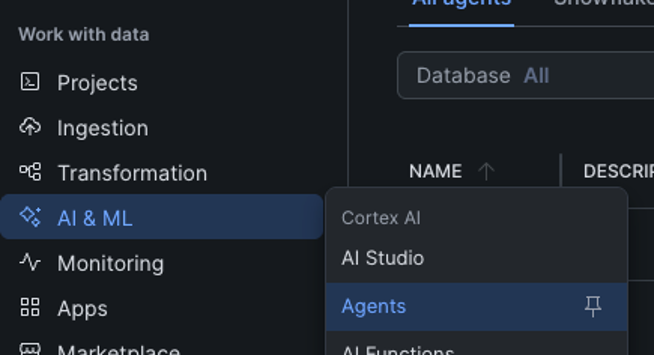
After assigning a database, schema and name, the agent is created, but not published yet.
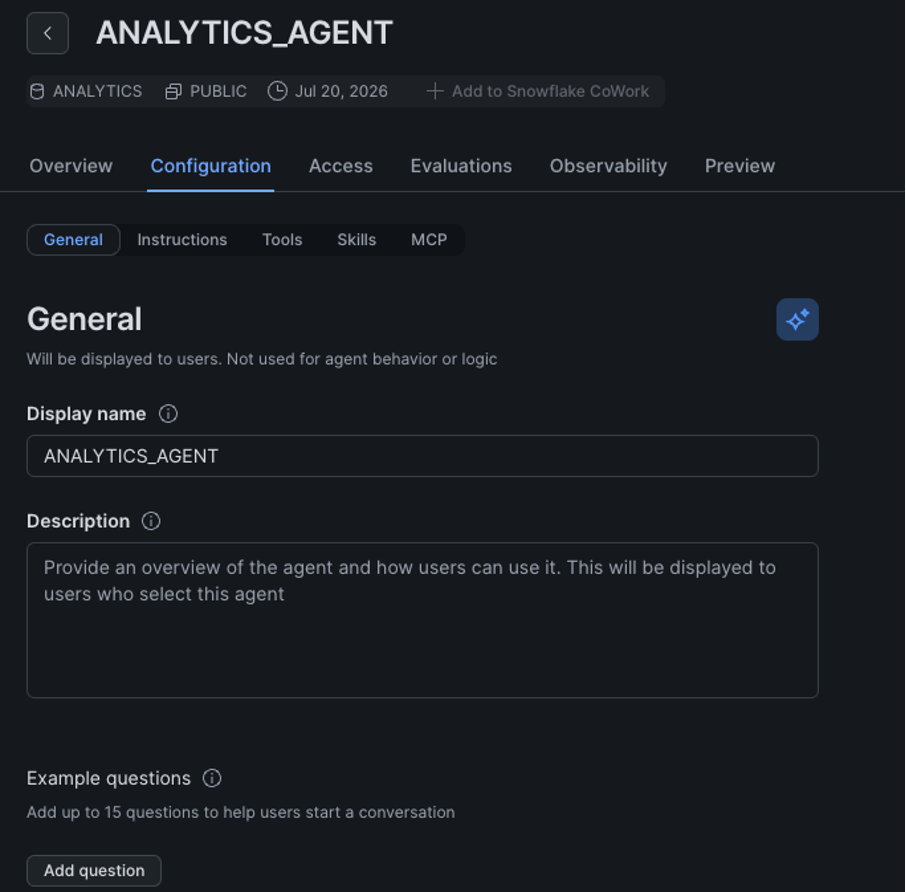
You can also configure options such as Access, Model Evaluations, Usage, and AI features like Web Search, but we’ll focus on the basic Cortex Analyst configuration using a Semantic View today.
Click on *Configuration* → *Tools* → *Add Semantic View*
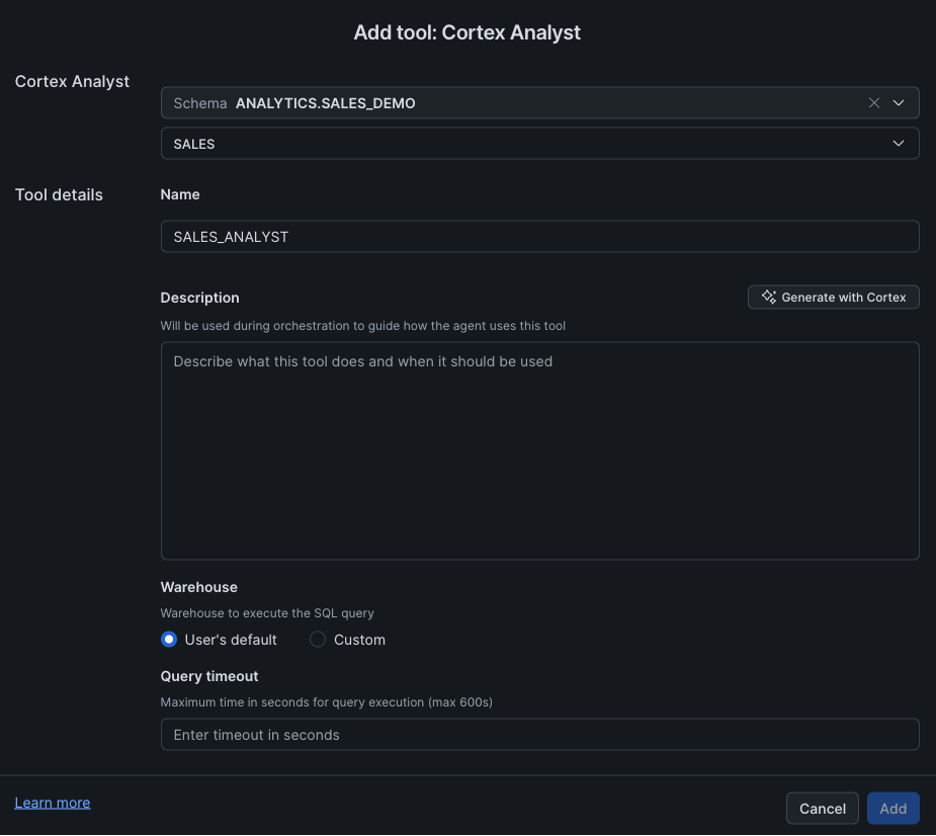
You can add Description for more general context and query timeout for budgeting.
After that you can Publish your Agent and start interacting with it in Snowflake CoWork:
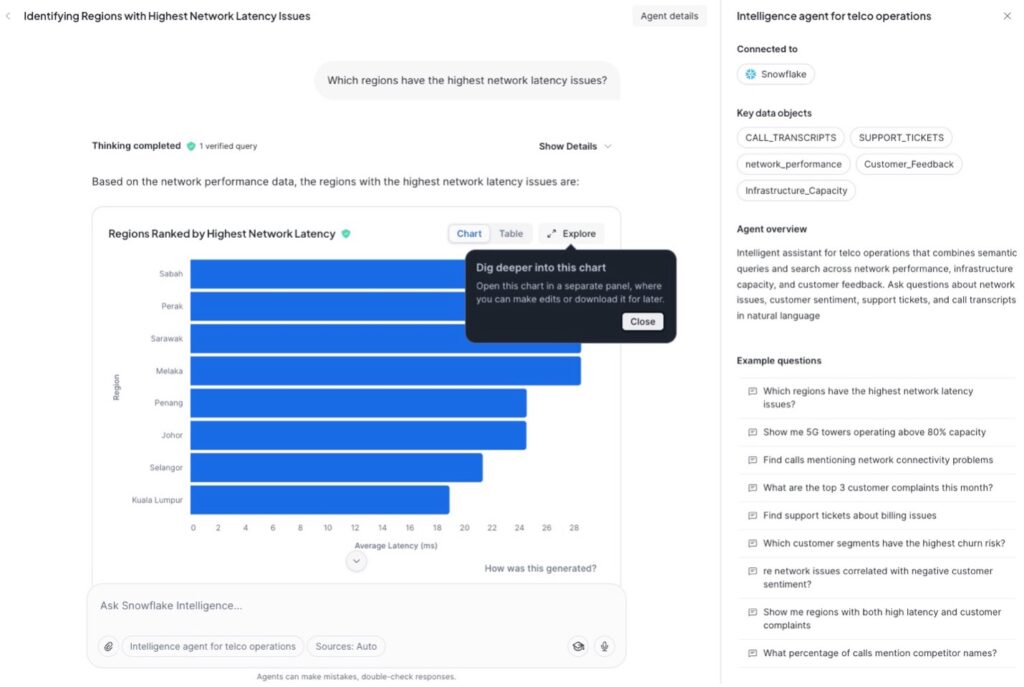
An additional note is that Cortex Agents are not tied to Snowflake CoWork, so if you want to deploy the same kind of experience outside of CoWork, Snowflake offers REST API options for accessing your custom-built agent.
Conclusion
The emergence of AI agents is changing how users interact with data. Instead of navigating dashboards or writing SQL, business users can simply ask questions in natural language and receive governed, data-driven answers. However, the quality of those answers depends on the context available to the agent.
This is where Snowflake Semantic Views become essential. By providing governed metrics, dimensions, relationships, and business definitions, they give analytics agents the context needed to accurately interpret user prompts and generate reliable SQL. Combined with additional capabilities such as web search, semantic views, and custom agent skills, Snowflake CoWork enables organizations to build powerful analytics agents that reason over trusted business concepts rather than raw database objects.
With the *dbt_semantic_view* package, these semantic definitions become part of the existing analytics engineering workflow. Teams can manage, version, test, and deploy Semantic Views alongside their dbt models, ensuring that both human users and AI agents always operate on a consistent, well-governed semantic layer. The result is an AI-ready analytics platform where trusted business knowledge is no longer confined to dashboards, but becomes accessible through natural language conversations.

Ready to Build an AI-Ready Analytics Foundation?
A governed semantic layer is more than an analytics best practice. It’s the foundation for trusted AI. Whether you’re implementing Snowflake Semantic Views, integrating them into your dbt workflows, or exploring agentic analytics with Snowflake CoWork, Hakkoda, an IBM Company, can help you design and deploy a scalable, AI-ready data platform.
Contact us today to learn how we can help you build a governed semantic layer that delivers consistent business insights for both people and AI.